Tag: Access Technology

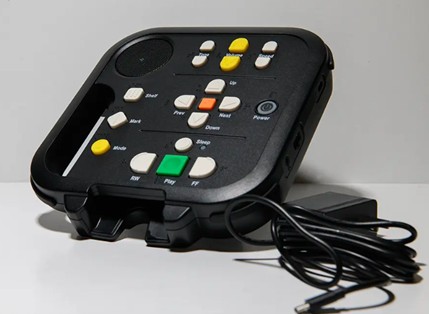
DA2 player with charging cord and all buttons displayed

Wisconsin Talking Book and Braille Library to Roll Out New Talking Book Players

Later this fall, the Wisconsin Talking Book and Braille Library (WTBBL) will begin rolling out a new talking book machine. The Digital Advanced Player 2 (DA2), will still play the classic talking book cartridges, but they will also connect to the internet so you can download books directly from BARD to your device. The National… Continue Reading Wisconsin Talking Book and Braille Library to Roll Out New Talking Book Players

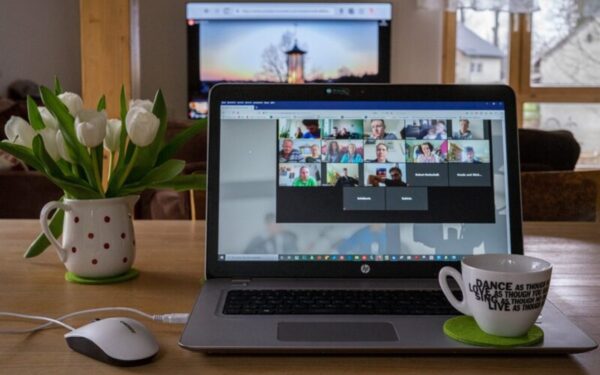
Laptop with a virtual meeting on the screen

Laptop Loan Program Helps Those Unable to Afford a Computer Practice Their AT Skills

Being comfortable using a computer is helpful for countless daily activities, including finding a job and staying in touch with friends and family. While the Council offers access technology (AT) training to help people learn how to use adaptive software like screen magnifiers and screen reader programs like JAWS, some clients are unable to afford… Continue Reading Laptop Loan Program Helps Those Unable to Afford a Computer Practice Their AT Skills

A computer screen with a lot of different program windows open.

Tech Tip: Access Technology Users Can Change Programs Quickly in Windows

These days, most computer users usually have more than one program running at a time. For example, we might be writing something in a word processor while our email program is open in another tab. But for users of JAWS, Fusion and other screen reader and magnification programs, switching between programs can be cumbersome. Fortunately,… Continue Reading Tech Tip: Access Technology Users Can Change Programs Quickly in Windows

Hands holding an iPhone showing the ChatGPT welcome screen.

You Can Use AI in Everyday Life

In November, Access Technology Specialist Jim Denham of the Council presented a webinar on how to use artificial intelligence (AI) to simplify everyday tasks. AI can streamline and assist with some computer tasks that are particularly challenging for people who are blind or low vision. Whether you’re writing a paper for a class or figuring… Continue Reading You Can Use AI in Everyday Life

A refreshable braille device.

Technology Changes, But the Value of Braille Does Not – A World Braille Day Message

Louis Braille was born on January 4, 1809, and that date is celebrated internationally as World Braille Day each year in recognition of his revolutionary raised dot system. Before the development of braille, people who were blind had virtually no independent access to written information, cutting them off from a vital form of communication. Today,… Continue Reading Technology Changes, But the Value of Braille Does Not – A World Braille Day Message

A computer monitor showing part of a Google search box magnified to a large size.

Built-In Versus Third-Party Magnifiers: Finding the Program that Works Best for You

For anyone living with low vision, using a screen magnifier on your computer is a must. There’s no need to struggle to read tiny text on a large monitor. Screen magnifiers are easy to use and can enlarge anything to help keep you connected to the digital world. But with several different screen magnifiers available,… Continue Reading Built-In Versus Third-Party Magnifiers: Finding the Program that Works Best for You

Click toggle for topics

DA2 player with charging cord and all buttons displayed

Wisconsin Talking Book and Braille Library to Roll Out New Talking Book Players

Later this fall, the Wisconsin Talking Book and Braille Library (WTBBL) will begin rolling out a new talking book machine. The Digital Advanced Player 2 (DA2), will still play the classic talking book cartridges, but they will also connect to the internet so you can download books directly from BARD to your device. The National… Continue Reading Wisconsin Talking Book and Braille Library to Roll Out New Talking Book Players

Laptop with a virtual meeting on the screen

Laptop Loan Program Helps Those Unable to Afford a Computer Practice Their AT Skills

Being comfortable using a computer is helpful for countless daily activities, including finding a job and staying in touch with friends and family. While the Council offers access technology (AT) training to help people learn how to use adaptive software like screen magnifiers and screen reader programs like JAWS, some clients are unable to afford… Continue Reading Laptop Loan Program Helps Those Unable to Afford a Computer Practice Their AT Skills

A computer screen with a lot of different program windows open.

Tech Tip: Access Technology Users Can Change Programs Quickly in Windows

These days, most computer users usually have more than one program running at a time. For example, we might be writing something in a word processor while our email program is open in another tab. But for users of JAWS, Fusion and other screen reader and magnification programs, switching between programs can be cumbersome. Fortunately,… Continue Reading Tech Tip: Access Technology Users Can Change Programs Quickly in Windows

Hands holding an iPhone showing the ChatGPT welcome screen.

You Can Use AI in Everyday Life

In November, Access Technology Specialist Jim Denham of the Council presented a webinar on how to use artificial intelligence (AI) to simplify everyday tasks. AI can streamline and assist with some computer tasks that are particularly challenging for people who are blind or low vision. Whether you’re writing a paper for a class or figuring… Continue Reading You Can Use AI in Everyday Life

A refreshable braille device.

Technology Changes, But the Value of Braille Does Not – A World Braille Day Message

Louis Braille was born on January 4, 1809, and that date is celebrated internationally as World Braille Day each year in recognition of his revolutionary raised dot system. Before the development of braille, people who were blind had virtually no independent access to written information, cutting them off from a vital form of communication. Today,… Continue Reading Technology Changes, But the Value of Braille Does Not – A World Braille Day Message

A computer monitor showing part of a Google search box magnified to a large size.

Built-In Versus Third-Party Magnifiers: Finding the Program that Works Best for You

For anyone living with low vision, using a screen magnifier on your computer is a must. There’s no need to struggle to read tiny text on a large monitor. Screen magnifiers are easy to use and can enlarge anything to help keep you connected to the digital world. But with several different screen magnifiers available,… Continue Reading Built-In Versus Third-Party Magnifiers: Finding the Program that Works Best for You